






“I highly recommend Kemicard for all of your membership use cases. We're more than happy with the results and the process was seamless from start to finish.”
Carmen Neely
President & CEO — The Harlem Center
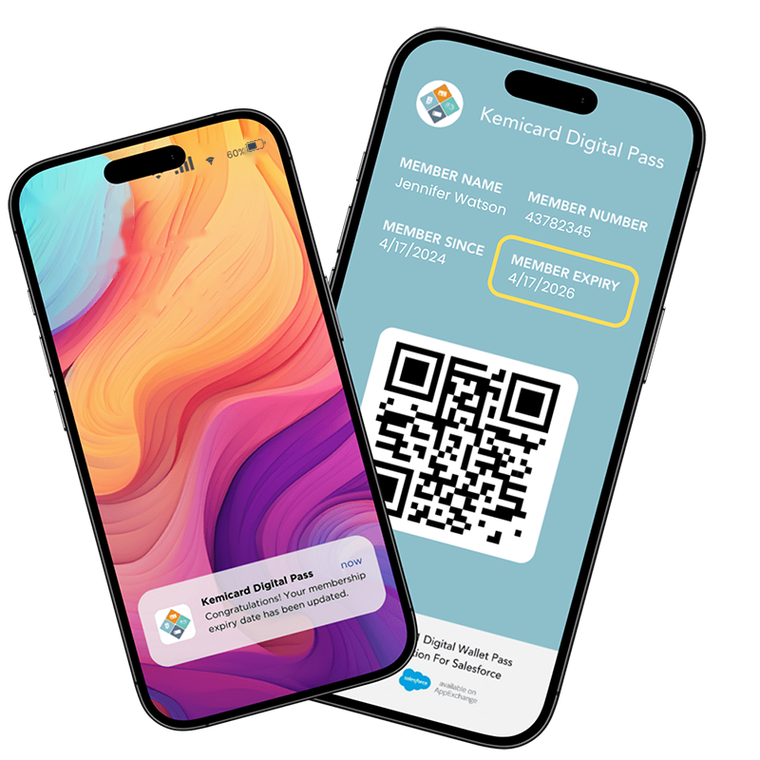
Kemicard creates Apple Wallet and Google Wallet passes from your Salesforce data, with no custom code. Map your fields, send a one-tap link, and every change in Salesforce updates the pass in real time. Kemicard is not just a live card — it is a new way to connect and engage with your customers, right on their lock screen.
The brands, vendors, and partners that trust Kemicard — clear social proof from industry leaders across nonprofits, retail, hospitality, events, education, and government.
Salesforce can help you create digital wallet passes, so why buy a pre-built Salesforce wallet pass? You can integrate Salesforce with Apple Wallet and Google Wallet with Apex and a few external services. However, that means your development team builds the integrations and owns Apex, the Apple Wallet API, and every spec change. Kemicard is the ready-made, Salesforce-native digital card solution that lets you configure passes with Flow and clicks — no custom coding required.
You are not buying Kemicard because the integration is impossible. You are buying Kemicard to have a digital wallet pass in Salesforce without the building and maintenance hurdles.
Kemicard turns a Salesforce record into a live wallet pass in three steps — with Salesforce as the source everything flows from.
Map your Salesforce fields to a pass template, and Kemicard generates the Apple Wallet or Google Wallet pass. Pull name, points, tier, expiry, and QR code straight from Leads, Contacts, or any custom object — and set your logo and brand colors to tailor it.
Send the add-to-wallet link to your members, and they save the pass with a single tap. Share it through email, SMS, WhatsApp, QR codes, or a landing page — all connected to Salesforce. No app to download and no login to set up.
When the record changes in Salesforce, the pass updates on the member's phone in real time. Push points, balances, renewal reminders, and new offers, all triggered from your existing Salesforce workflows — no reissuing, no separate system.
Your admin builds, distributes, updates, and measures every pass without leaving the CRM or writing code.
Kemicard installs from the AppExchange and runs entirely inside your Salesforce org. Passes generate from your CRM data with no middleware, no external database, and no sync jobs.
Explore the platformPush notifications, real-time updates, and geofenced offers turn every pass into a live engagement channel — with 80–90% visibility versus 15–20% typical email open rates.
See engagement featuresNo-code Template Builder, bulk issuance, scan-back logging, one-click template switching, and native Salesforce analytics — everything a pass program needs, out of the box.
View all featuresKemicard works as a Salesforce-native digital card, so it updates passes right where you already work.
Generate branded Apple Wallet passes from the CRM records your team already manages.
Create the same pass for Android — from the very same record. One design, both wallets.
Skip the Salesforce Apex wallet pass build and configure everything with Flow and clicks — no code.
Change a record, and Kemicard pushes real-time wallet updates from Salesforce onto the member's phone instantly.
Track installs, opens, and redemptions inside standard Salesforce dashboards, beside the rest of your customer data.
Kemicard fits any team that hands out cards or passes. If your members live in Salesforce, your passes can too.
| Industry | Typical passes | |
|---|---|---|
| Nonprofits & Associations | Donor cards, volunteer IDs, and membership passes | Explore |
| Retail | Loyalty cards, points cards, and offer coupons | Explore |
| Hospitality | Guest loyalty cards, membership tiers, and venue access passes | Explore |
| Events & Entertainment | Event tickets, VIP passes, and exhibitor badges | Explore |
| Education | Student IDs, alumni cards, and campus access passes | Explore |
| Government | Digital IDs, permits, and licenses | Explore |
No app required for your members.View All Features
These are the teams already running Salesforce wallet passes with Kemicard. Read how they set it up and what changed.
“I highly recommend Kemicard for all of your membership use cases. We're more than happy with the results and the process was seamless from start to finish.”
Carmen Neely
President & CEO — The Harlem Center
“Our organization recently completed our Kemicard implementation, and the support team provided exceptional guidance throughout the entire project. Their responsiveness and dedication made all the difference.”
Jean Pierre Exil
Salesforce Administrator — GSHAC
“Replacing printed membership cards with wallet passes cut our fulfillment costs and gave us a direct channel to members' phones — all inside the Salesforce org we already run.”
Membership Operations Lead
National nonprofit organization
Experience the pass first, explore the app hands-on, then run it in your own Salesforce org — no commitment at any step.
Scan the QR code above and our team will deliver your personal Kemicard pass by email, straight to Apple Wallet or Google Wallet. See the live card exactly as your members would.
Scan the QR codeOpen our hosted Test Drive org on AppExchange and click through Kemicard first hand — templates, passes, and updates are already set up. No installation and nothing to configure on your side.
 Launch Test Drive
Ready to go deeper? Install Kemicard in your Salesforce sandbox free for 30 days with Get It Now, following the Installation Guide and the Getting Started walkthrough.
Start Free 30-Day Trial
Kemicard is priced by the number of passes you issue each year, so your plan grows with your program. Nonprofits get 10% off every plan.
| Plan | Passes / year | Price / year (USD) | User licenses |
|---|---|---|---|
| Starter | 5,000 | $3,500 | 1 |
| Builder | 10,000 | $6,600 | 2 |
| Growth | 15,000 | $9,600 | 3 |
| Scale | 20,000 | $12,400 | 4 |
| Legacy | 25,000 | $15,000 | 5 |
| Enterprise Basic | 50,000 | $25,000 | Unlimited |
| Enterprise Essential | 100,000 | $37,500 | Unlimited |
Yes. Kemicard installs as a wallet pass app for Salesforce and uses your standard and custom objects as the source, so Leads, Contacts, Campaigns, and Opportunities can all drive a pass. It works with your existing Salesforce setup.
Kemicard is available on the Salesforce AppExchange. You can test drive it in our hosted org with zero setup, or start a free 30-day trial in your sandbox. You install it into your org like any other managed package, then configure your templates and fields — so you can be up and running without wiring in external systems.
No. Apple Wallet for Salesforce passes and Google Wallet for Salesforce passes save with a single tap on the add-to-wallet link, using the wallet app already built into the phone. There is nothing for your members to install or log into.
Yes. Kemicard can generate an Apple Wallet pass from Salesforce and connect Salesforce to Google Wallet from the same record, so iPhone and Android members each get the right format. You design the pass once, and Kemicard handles both.
Your data stays in Salesforce, and every pass is encrypted in transit and storage with a unique identifier for fraud prevention. Kemicard also maintains security and compliance documentation that you can review while evaluating — so your security team has material to assess before rollout.
Map a few fields and watch a live Apple Wallet or Google Wallet pass come together. Book a demo, or start free on the AppExchange.