The Digital Pass That Connects · 100% Salesforce-Native · Live on AppExchange
Salesforce-Native Apple Wallet and Google Wallet Passes
Kemicard creates Apple Wallet and Google Wallet passes from your Salesforce data, with no custom code. Map your fields, send a one-tap link, and every change in Salesforce updates the pass in real time. Kemicard is not just a live card — it is a new way to connect and engage with your customers, right on their lock screen.
Powering Salesforce Digital Wallet Passes for Organizations Worldwide
The brands, vendors, and partners that trust Kemicard — clear social proof from industry leaders across nonprofits, retail, hospitality, events, education, and government.
Higher engagement compared to traditional plastic cards
Instant
Mobile delivery through Apple Wallet and Google Wallet
Real-Time
Updates without requiring users to install an app
Source: aggregated results across Kemicard customer programs.
Why Kemicard
Skip the Build. Get a Pre-Built Salesforce Wallet Pass
Salesforce can help you create digital wallet passes, so why buy a pre-built Salesforce wallet pass? You can integrate Salesforce with Apple Wallet and Google Wallet with Apex and a few external services. However, that means your development team builds the integrations and owns Apex, the Apple Wallet API, and every spec change. Kemicard is the ready-made, Salesforce-native digital card solution that lets you configure passes with Flow and clicks — no custom coding required.
Build it Yourself vs Kemicard
Build it Yourself
Kemicard (Salesforce-native)
Setup
Apex, the Apple Wallet API, and external services
Configure with Flow and clicks, no custom code
Time to launch
Months of development
Days to a few weeks
Apple & Google Wallet specs
Your team tracks .pkpass and OS changes
Handled and updated for you
Pass lifecycle
Build issue, update, renewal, and expiry yourself
Built in and automated
Real-time updates
Custom triggers and integrations
Native updates the moment a record changes
Analytics
Build your own reports
Standard Salesforce dashboards and reports
New use cases
Rebuild for each one
Reuse templates across membership, loyalty, events, and IDs
Maintenance
Your developers own it long term
Offloaded to Kemicard
You are not buying Kemicard because the integration is impossible. You are buying Kemicard to have a digital wallet pass in Salesforce without the building and maintenance hurdles.
Standalone wallet platforms make you export your data, build integrations, and train your team on someone else's tools. Kemicard removes all three problems at once.
Your Data Never Leaves Your Org
Members, templates, and scan events live in your Salesforce org, under your security model. We hold a strict policy against storing customer data on our servers — the Kemicard Server is stateless — so your data stays secured and there are no privacy issues to explain to your compliance team.
No APIs, No Integration Project
Non-Salesforce platforms start with an integration: APIs to build, connectors to license, sync jobs to babysit. Kemicard is native — install from the AppExchange and your existing records drive passes directly. There is nothing to integrate, and nothing to break.
No New Skills to Learn
Your team already knows Flow, reports, and page layouts — and that is exactly the technology Kemicard uses. No new vendor portal, no new query language. Change management is smooth and the learning curve is short, because it isn't really a new system at all.
How Kemicard Works
Salesforce Wallet Pass Automation in Three Steps
Kemicard turns a Salesforce record into a live wallet pass in three steps — with Salesforce as the source everything flows from.
1. Create a Pass
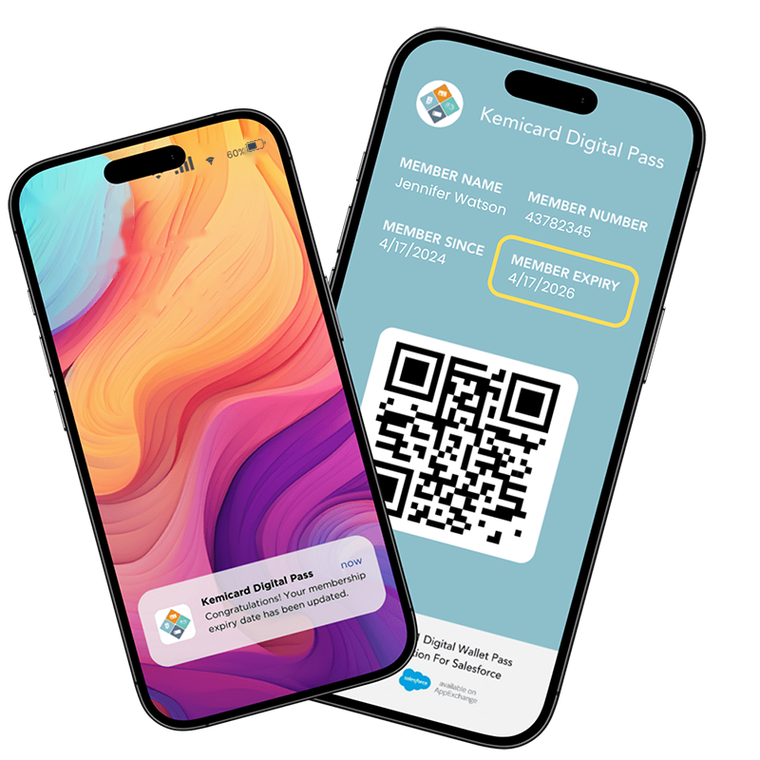
Map your Salesforce fields to a pass template, and Kemicard generates the Apple Wallet or Google Wallet pass. Pull name, points, tier, expiry, and QR code straight from Leads, Contacts, or any custom object — and set your logo and brand colors to tailor it.
2. Distribute the Pass
Send the add-to-wallet link to your members, and they save the pass with a single tap. Share it through email, SMS, WhatsApp, QR codes, or a landing page — all connected to Salesforce. No app to download and no login to set up.
3. Update the Pass
When the record changes in Salesforce, the pass updates on the member's phone in real time. Push points, balances, renewal reminders, and new offers, all triggered from your existing Salesforce workflows — no reissuing, no separate system.
Your admin builds, distributes, updates, and measures every pass without leaving the CRM or writing code.
Platform Overview
Kemicard installs from the AppExchange and runs entirely inside your Salesforce org. Passes generate from your CRM data with no middleware, no external database, and no sync jobs.
Push notifications, real-time updates, and geofenced offers turn every pass into a live engagement channel — with 80–90% visibility versus 15–20% typical email open rates.
No-code Kemicard Studio, bulk issuance, scan-back logging, one-click template switching, and native Salesforce analytics — everything a pass program needs, out of the box.
These are the teams already running Salesforce wallet passes with Kemicard. Read how they set it up and what changed.
★★★★★
“We searched for various solutions and finally found Kemicard! It works perfectly! The software is native to Salesforce and is easy to manage. We love the ability to have and create our own custom designs and currently have a different card for each of our membership levels.”
“Our nonprofit organization recently completed our Kemicard implementation, and the process was seamless from start to finish. The Kemisoft support team provided exceptional guidance throughout the entire project. Their responsiveness, expertise, and dedication made all the difference. I highly recommend their platform.”
“The Kemicard team was responsive, answering every question and explaining every detail. Additionally, they're helping us to determine which scanning hardware best fits our use case. I highly recommend Kemicard for all of your membership use cases and related hardware needs. We're more than happy.”
We’d love for you to test Kemicard for yourself. Scan the QR code, provide some basic information, and our team will deliver your personal Kemicard pass via email — straight to your Apple Wallet or Google Wallet.
SCAN ME
From first scan to your own org
Try Kemicard in Three Easy Steps
Experience the pass first, explore the app hands-on, then run it in your own Salesforce org — no commitment at any step.
1. Scan the QR — Feel the Card
Scan the QR code above and our team will deliver your personal Kemicard pass by email, straight to Apple Wallet or Google Wallet. See the live card exactly as your members would.
Open our hosted Test Drive org on AppExchange and click through Kemicard first hand — templates, passes, and updates are already set up. No installation and nothing to configure on your side.
Ready to go deeper? Install Kemicard in your Salesforce sandbox free for 30 days with Get It Now, following the Installation Guide and the Getting Started walkthrough.
Yes. Kemicard installs as a wallet pass app for Salesforce and uses your standard and custom objects as the source, so Leads, Contacts, Campaigns, and Opportunities can all drive a pass. It works with your existing Salesforce setup.
Kemicard is available on the Salesforce AppExchange. You can test drive it in our hosted org with zero setup, or start a free 30-day trial in your sandbox. You install it into your org like any other managed package, then configure your templates and fields — so you can be up and running without wiring in external systems.
No. Apple Wallet for Salesforce passes and Google Wallet for Salesforce passes save with a single tap on the add-to-wallet link, using the wallet app already built into the phone. There is nothing for your members to install or log into.
Yes. Kemicard can generate an Apple Wallet pass from Salesforce and connect Salesforce to Google Wallet from the same record, so iPhone and Android members each get the right format. You design the pass once, and Kemicard handles both.
Your data stays in Salesforce, and every pass is encrypted in transit and storage with a unique identifier for fraud prevention. Kemicard also maintains security and compliance documentation that you can review while evaluating — so your security team has material to assess before rollout.






















 Launch Test Drive