

API & Developers: From Clicks to Code
Admins automate Kemicard with Flow. Developers go further with the invocable Apex actions behind it — and external or custom systems can integrate through the Kemicard Server. Either way, the pass lifecycle — issue, update, expire, query — is fully programmable. Automate wallet passes — API-level control from Flow, Apex, and the Kemicard Server.
Invocable Actions for Every Pass Operation
Kemicard exposes its core operations as invocable actions available to Flows and automation across Sales Cloud, Service Cloud, Nonprofit Cloud, and Marketing Cloud journeys. If your admin can build a Flow, they can run the pass lifecycle.
- Generate Pass — create a pass for a record against a chosen template.
- Send Message — push a notification to one pass or a whole segment.
- Switch Template — change a pass design in real time (tier upgrades, seasonal cards, error states).
- Expire / Revoke — end-of-life a pass from the same automation that issued it.
// Apex: issue a pass from a trigger-safe context
KemicardAPI.GeneratePassRequest req =
 new KemicardAPI.GeneratePassRequest();
req.recordId = contact.Id;
req.template = 'Gold_Member';
req.sendEmail = true;

KemicardAPI.GeneratePassResult res =
 KemicardAPI.generatePass(req);

System.debug(res.passUrl); // signed add-to-wallet linkThe Same Pass, Issued From Code
A pass created through the API is not a different kind of pass. It carries the same anatomy, the same update channel and the same back page as one issued by a Flow — which is what makes it safe to automate.
 Vertex Labs
The card. Created by a single call, rendered identically.

On the lock screen. Push sent programmatically, delivered natively.
410 Innovation Way
Edmonton, AB T5J 0N3
The back of the pass. Fields and links set in the payload.
Issue, Update, and Revoke Passes Over HTTPS
Authenticate with a bearer token and drive passes from any system — HubSpot workflows, a POS, a booking engine, or your own app.
POST /passes
Create a pass from a record ID and template. Returns a signed add-to-wallet URL that resolves per device.
PATCH /passes/:id
Update fields, switch templates, or trigger a push notification for an installed pass.
DELETE /passes/:id
Revoke a pass. The wallet copy is invalidated and the action logs with a timestamp.
GET /passes/:id
Query pass status: installed, removed, last updated, last scanned.
Webhooks
Subscribe to pass.installed, pass.scanned, pass.updated, and pass.removed — JSON payloads POSTed to any listener you register.
Sandbox-first
Full API available in sandbox orgs, so CI and UAT flows run before production.
How the Pipeline Works
Your org calls the Kemicard backend through a named credential. Pass events stream through a Pub/Sub pipeline to Apple's APNs and the Google Wallet API — so updates land on phones in seconds, at bulk scale.
1. Salesforce org
Records, templates, Flows, and the Kemicard managed package — your system of record.
2. Named credential
Secure, admin-controlled authentication from your org to the Kemicard backend.
3. Event pipeline
Real-time pass event processing handles generation, updates, and push fan-out.
4. Wallets
Signed .pkpass bundles to Apple Wallet via APNs; JWT-signed objects to Google Wallet via the Wallet API.
An Open Platform With Standard RESTful APIs
Salesforce is Kemicard's home and our preferred CRM platform — the managed package, Kemicard Studio, and Flow actions are all Salesforce-native. But the engine behind them, the Kemicard Server, sits outside Salesforce and speaks standard RESTful APIs.
That means any third-party platform or custom system you run — a booking engine, a ticketing system, an in-house member portal, another CRM — can integrate directly with the Kemicard Server to generate, update, and manage Apple Wallet and Google Wallet passes. If your data doesn't live in Salesforce, Kemicard still works for you.
Talk to us about API access and integration patterns via sales, or review the API reference and architecture overview.
Further reading
From the blog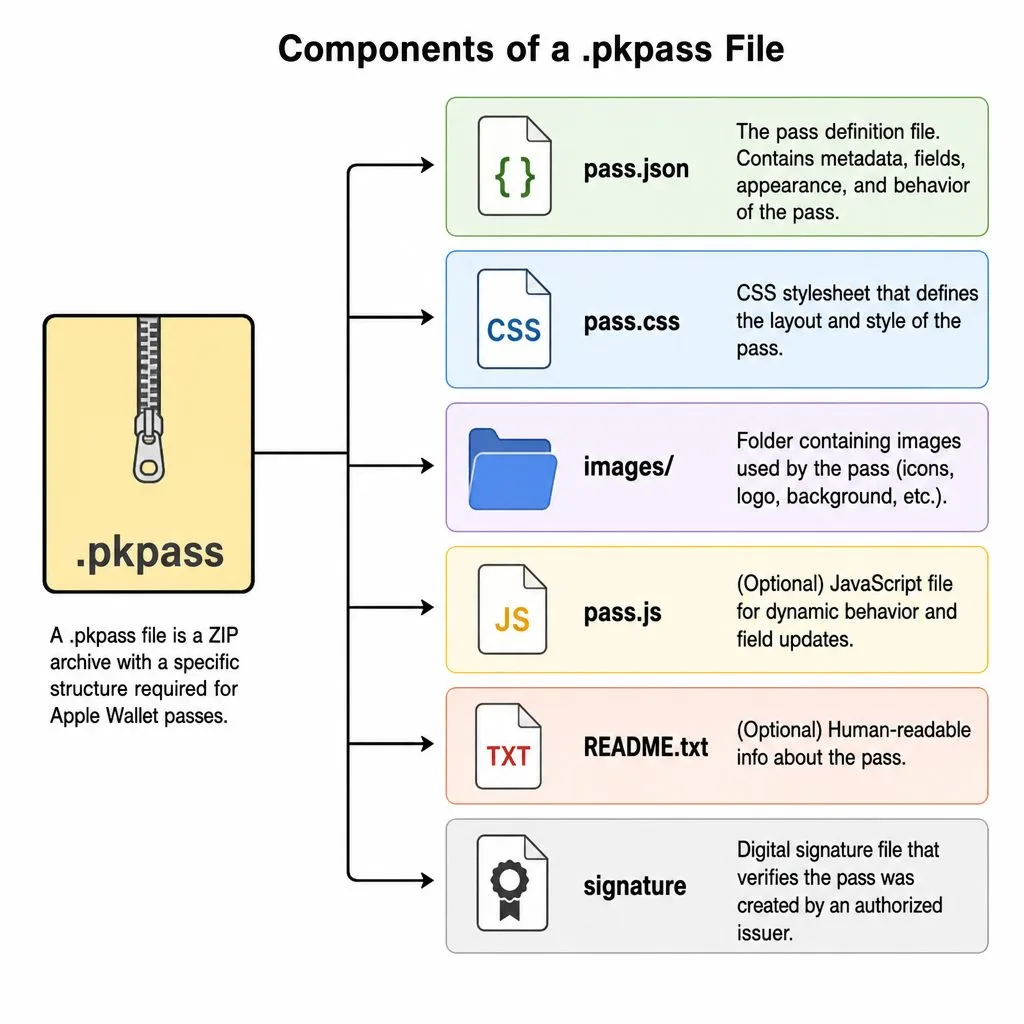

Build on Kemicard
Get the full API reference, or talk to us about a custom integration.