

Fitness Studios & Wellness Clubs: Digital Membership Cards from Salesforce
 By the Kemicard team
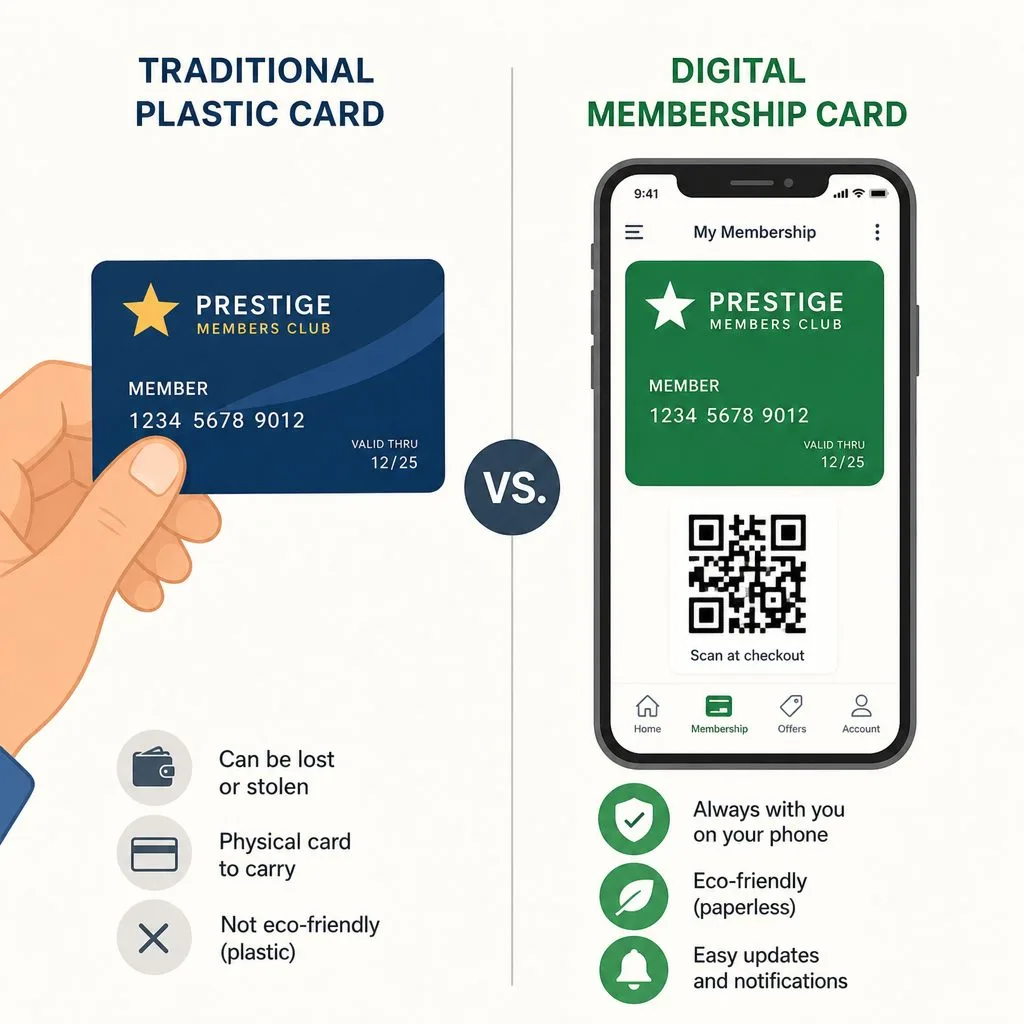
A digital gym membership card is a pass in Apple Wallet or Google Wallet that a member shows at the front desk to prove the membership is active. For fitness studios and wellness clubs running on Salesforce, the card is created from the member record itself, so it shows the membership type, member number, expiry date and the barcode the desk scans. Kemicard is a Salesforce-native AppExchange app that issues Apple Wallet and Google Wallet passes from Salesforce records.
This guide is for membership and operations managers at multi-site fitness operators, and the Salesforce Admins who support them.
This blog covers what a digital gym membership card holds, where gym member data is kept in Salesforce, and how a club issues one card that works across its locations.
What Is on a Digital Gym Membership Card?
A wallet pass has two sides. The front side holds the member information before scanning in, and it holds the club logo, a few labeled fields, and a barcode.
The fields on the front side can be set up. A gym card and a yoga studio card can have different details even though both are built the same way. Each slot points to a field on the Salesforce record, so a membership card issued from Salesforce carries the member's own plan and dates.
Some of the fields a fitness club puts on the front:
- Member name read from the Contact record.
- Membership type
- Member number used for identification
- Home club for an operator with more than one site
- Class pack balance. Sessions left on a pack, where the studio tracks that on a field.
- Expiry date. The date the membership runs to.
- Barcode or QR code. What gets scanned at the desk or the turnstile.
Apple Wallet and Google Wallet both limit how much goes on the front. So a club picks the details the desk needs to see and leaves the rest.
Booking and Renewal Links on the Back of the Card
The back of a pass is a text panel the member reaches by tapping the card. Kemicard renders those back text fields as tappable links, which makes the back a place for links the club wants the member to have.
A fitness studio can put a class booking link on the back, along with a renewal link, an upgrade link, the timetable page, the front desk phone number and the guest pass policy.
Back content is editable without issuing a new card. A club that changes its booking URL updates the field, and the card the member already saved points to the new address.
Gym Key Fob vs Digital Gym Membership Card
A gym key fob is a plastic credential on a keyring. It holds an ID number, and the reader at the door matches that number to a member in the club's system. The fob does the job of verifying the gym membership.
A digital gym membership card does the same identification job from the phone, with the membership details written on the card. The member reads the plan and the expiry date off it. The desk reads the same fields when the card is shown.
So the fob and the wallet card reach the door by different routes.
| Point | Gym key fob | Digital gym membership card |
|---|---|---|
| What the member carries | Plastic fob on a keyring | A pass saved in Apple Wallet or Google Wallet |
| Who issues it | Front desk, from fob stock | Issued from the member record in Salesforce |
| Replacing a lost one | Member comes to the desk for a new fob | Sent again as a link |
| How it reads at the door | RFID at the club's own reader | Barcode or QR scan |
| What the credential holds | An ID number | Labeled membership fields plus the barcode |
| Cost per member | Price of the fob and its printing | No physical stock to buy |
| A second club location | That site's reader has to recognize the fob | Same card, scanned at each site |
Clubs running wallet passes for access control keep the member credential in the same place as the membership details, so the desk reads one thing instead of looking up a fob number.
A barcode scan is the simplest way to verify a wallet membership card, because it works with any reader that reads a code off a screen. A scanner at the front desk reads the code off the phone, and the club's system checks the membership behind it.
So a club with RFID turnstiles already installed has two options for the same door, a barcode reader or reader hardware certified for Google Smart Tap (Kemicard's NFC add-on, Google Wallet only). The reader model decides which of those is open.
Where Does Gym Member Data Live in Salesforce?
A card reads from records that already exist in the org. So the question for a club is which record holds the membership, and which field on it holds each detail the card carries.
Salesforce as a Gym CRM or Fitness Studio CRM
Salesforce keeps the member as a Contact. Around that Contact, a club holds the parts a membership is made of.
- Contact: The member. Name, email, phone, and the member number.
- Account: Used for a corporate membership or a family plan, with the individual members linked to it.
- A membership record: Either a custom object for the membership, or a set of fields on the Contact. Holds the plan, the start date, and the expiry date.
- Opportunity or Order: The sale behind the membership.
- Campaign: Classes, workshops, and club events a member signs up for.
Sales Cloud and Service Cloud do not ship class scheduling, door hardware or recurring membership billing. Studios using Salesforce as a fitness studio CRM either build those pieces or keep a gym platform running alongside it.
Gym Membership Card Fields and Their Salesforce Fields
Each card slot points to one field, and the Salesforce records a membership card reads from are the same records the club's staff already open.
| Card field | Salesforce field it reads |
|---|---|
| Member name | Name on the Contact |
| Membership type | Picklist on the membership record |
| Member number | Unique text field on the Contact |
| Home club | Lookup to a location record, or a picklist |
| Class pack balance | Number field on the membership record |
| Expiry date | Date field on the membership record |
| Barcode value | The member number, or a separate unique ID field |
Field names differ by org, so the right column describes what the field is rather than naming it.
Mindbody and Salesforce for Fitness Studios
Mindbody is booking and scheduling software used by studios and spas. No first-party Mindbody connector for Salesforce exists. Mindbody publishes a public API, and links between the two systems get built on that API or through third-party middleware.
So a studio running both has a decision to make about which system is the member of record. Two routes exist.
- Salesforce as the record of truth. Bookings and visits get pushed in from Mindbody.
- Mindbody as the operational system. Member records get synced out to Salesforce.
The card reads the Salesforce field either way. So the field holding membership status has to be the one the sync keeps current. Kemicard's integration points are on the Salesforce side, which leaves the Mindbody sync as a separate piece of work for the club.
How Do Fitness Studios Create a Gym Membership Card in Salesforce?
Creating the card is configuration work. A template is designed once, and its slots are pointed at fields on the membership record. After that, Salesforce automation creates the card when a member meets a condition.
When the Card Is Issued to a Member
The trigger is a record change, and a club picks which change counts.
- Membership activated: The status field on the membership record moves to active.
- First payment taken: The Opportunity or Order closes.
- Trial started: A trial membership record is created with its own end date.
- Class pack purchased: A pack record is created with the session count on it.
- Joining at a specific site: A location field is set, for an operator issuing a different template per club.
A record-triggered Flow watches the field and calls the Kemicard Flow action that creates the pass. That is the same path membership cards created in Salesforce follow for any card type, so a gym card needs no separate mechanism.
What the Club Sets Up Once
The first step is designing the card template in the Kemicard template builder, followed by mapping each slot to a field on the membership record. The Flow trigger conditions get set after that.
The club needs no Apple or Google issuer account of its own, and no certificates. Passes are signed by the stateless Kemicard Server, which stores no customer data, so there is no certificate or key for the club to hold or renew.
So the pieces a club touches again later are the template design and the trigger conditions. Clubs that would rather generate the pass files in-house are taking on the signing and hosting work behind a self-built wallet pass instead.
Once the template and the Flow are in place, a new member's card is created from the record without anyone opening the template again.
Final Take
A gym membership card stays accurate when the card and the membership are the same record. The plan and the expiry date are in Salesforce already, and the card reads them on the member's phone. A club issuing cards this way keeps no fob stock behind the front desk.
The setup work is front-loaded. One template and one set of field mappings, and the Flow condition is set once. After that, a new member gets a card because the record says the membership qualifies.
Kemicard is a Salesforce-native application, downloaded from the AppExchange as a managed package. Card templates are built inside Salesforce, and each card is issued from the member record. For a fitness studio or a wellness club, that leaves no second member database to keep in step with the first.
Fitness club digital membership cards read the fields a club's own staff maintain, including membership type, expiry date, class pack balance and home club. Update the field and the card carries the new value. Wallet vendors such as PassKit issue gym cards from their own member database, which leaves the club a sync to Salesforce to maintain.
Kemicard fits multi-site operators that already run membership in Salesforce. Plans are priced by cards issued a year, starting at 5,000 cards for $3,500, so a single studio with a few hundred members is usually better served by its booking platform's own card.
Explore Kemicard
Product & solutions
Issue Your First Gym Membership Card From Salesforce
Kemicard installs from the AppExchange as a managed package, so the card reads the membership fields already in your org. One template and one trigger condition is enough to start.
 Start the AppExchange Trial
Frequently Asked Questions
Yes. A single template can carry a home club field that reads the location held on the member's record, and a multi-site operator can also run a separate template per site. Scan data returns to the member record either way, so reporting inside Salesforce can be split by location.
The member taps the add-to-wallet link the club sends, and the card saves to Apple Wallet. No app download and no account login are involved. Android members save the same card to Google Wallet, and the differences between the two wallet formats are on the club's side rather than the member's.
A screenshot of an active member's barcode scans as that member, because the barcode carries the member's ID. Every scan is logged to the member record, so two scans of one card at different desks in a short window show up in Salesforce reports. Kemicard also applies the wallets' own sharing controls, with Apple allowing the Share button to be switched off and Google limiting a pass to one user across their devices. Member data on a wallet pass is governed by field-level security in the org, so the card carries only the fields the template maps.
Yes. A trial card is a template with its own end date, issued from a trial record rather than a full membership. Single-use enforcement is built in, so a club switches it on per template in the Flow during setup, with no code. Template and field controls in Kemicard decide which details a day pass carries.
Yes. A golf club membership card and a spa membership card read from the same kind of membership record, with the template changing rather than the mechanism. Country clubs and health clubs follow the same path, and clubs attached to a hotel or resort are covered by wallet passes for hospitality operators.
Sources: Apple Developer: PassFields, PassFieldContent and Pass; Google Wallet: Generic pass template, LinksModuleData, MultipleDevicesAndHoldersAllowedStatus and Smart Tap overview; Mindbody: Developer Portal; Trailhead: Record-Triggered Flows and Data Security: Control Access to Fields.