Short Links is an add-on, new in Kemicard 2.31. Once it is on, every new pass gets a short, readable link for Apple Wallet and another for Google Wallet. The links fit in emails and text messages, and they expose no record IDs.
Watch the demo
Harbor Point turns on Short Links, sends a Season Ticket to a member, and finds the two short links on the pass. Harbor Point is a fictional organization; the recording uses fictional sample data.
Read every on-screen caption (6)
How short links work
- One name for your organization. The Short Link Name is 3 to 10 letters or numbers, such as your organization's initials. It is part of every short link. Once saved it is locked; contact Kemicard Support to change it.
- One code per pass. Each pass has an 8-character Short Code. A short link is built from your short link name and the pass's Short Code.
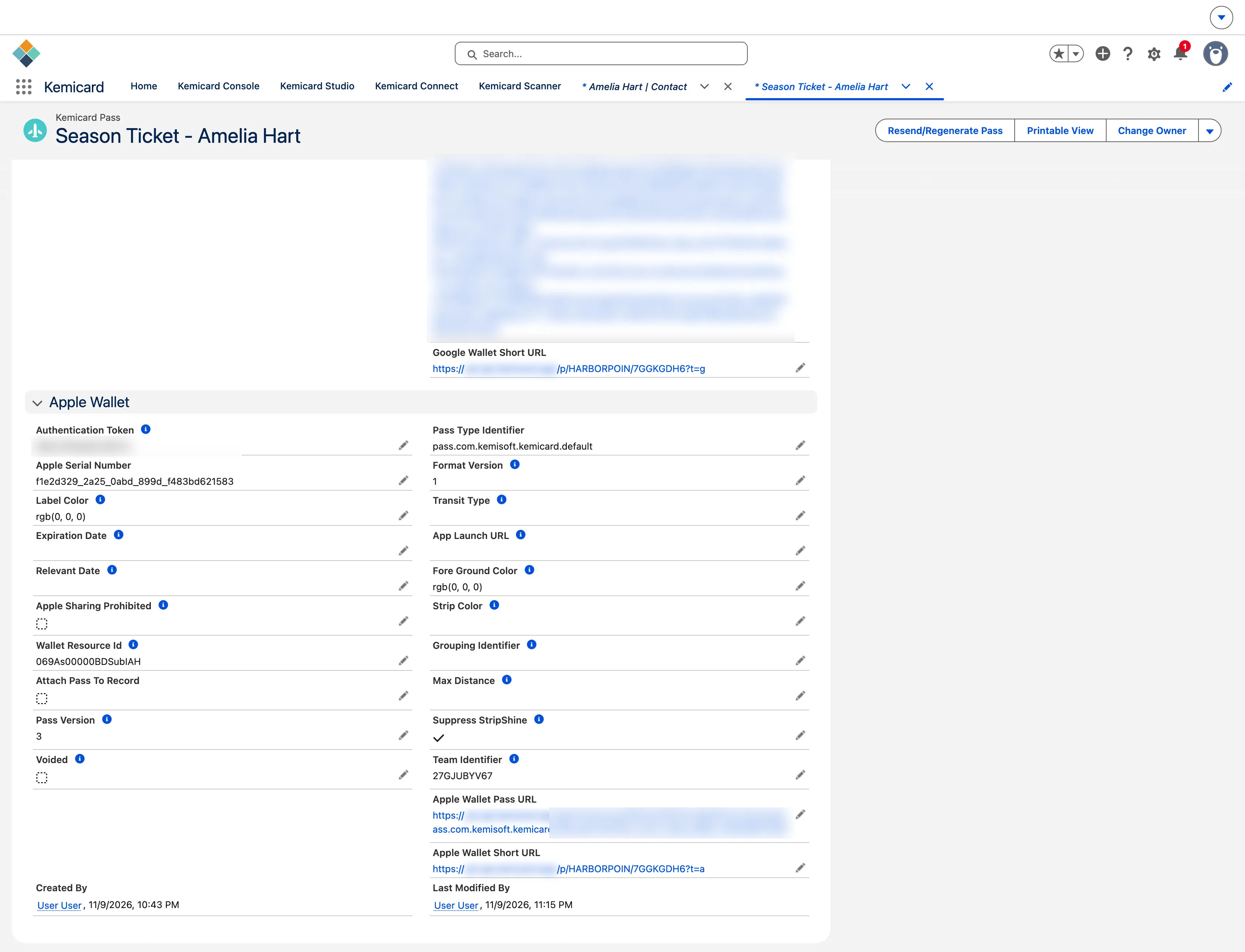
- Two links per pass. The Kemicard Pass record stores an Apple Wallet Short URL and a Google Wallet Short URL. A link ending
?t=aopens Apple Wallet and one ending?t=gopens Google Wallet. - New passes only. Each pass generated after you turn Short Links on gets short links. Passes created before keep their standard links.
Before you start
- The Short Links add-on is active for your organization. If it is not, the Short Links tile offers Request Feature Activation.
- Permissions. Turning Short Links on or off is for Salesforce administrators. It needs the Customize Application permission and the Kemicard Features Access custom permission.
- A pass template linked to your records. The demo uses Season Ticket, set in the Membership Pass Template field on Contact.
Step 1 — Turn on Short Links
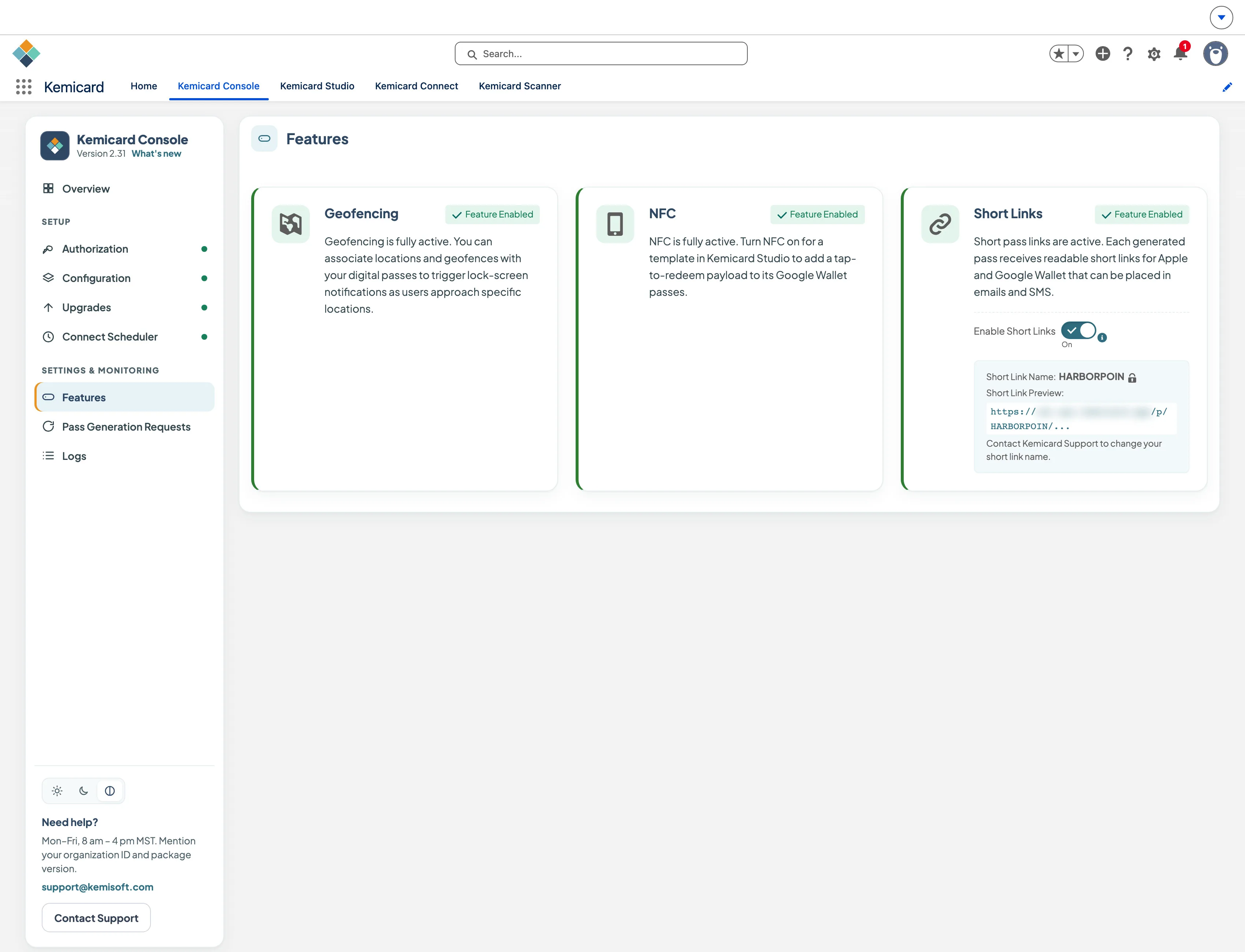
- Open the Kemicard Console tab and choose Features.
- On the Short Links tile, switch on Enable Short Links.
- The first time, enter your Short Link Name (3 to 10 letters or numbers). Kemicard checks that it is available and shows a Short Link Preview.
- Click Save & Enable.
Step 2 — Send a pass
- Open the member's Contact record and choose Details.
- Check that Membership Pass Template is set to the template, here Season Ticket.
- Click Send Membership Pass.
Kemicard creates the pass for Apple Wallet and Google Wallet, emails it to the member, and stores a short link for each wallet on the pass. Send Membership Pass is a button in the demo org; short links are added to each newly generated pass, however you generate it.
Step 3 — See the short links
- Open the pass record from the Kemicard Passes list or search.
- On Details, note the Short Code.
- Expand Google Wallet and Apple Wallet to read the Google Wallet Short URL and Apple Wallet Short URL.
The links are ready for your own emails, text messages and flows.
Fields at a glance
| Field | Where | What it holds |
|---|---|---|
| Short Link Name | Console › Features › Short Links | Your organization's name in every short link. Permanent once saved. |
Short Code (Short_Code__c) | Kemicard Pass | The 8-character code that identifies the pass in its short links. Set on every new pass, whether or not Short Links is on, and locked once set. |
Apple Wallet Short URL (Apple_Short_Pass_Url__c) | Kemicard Pass | Short link that opens the pass in Apple Wallet. |
Google Wallet Short URL (Google_Short_Pass_Url__c) | Kemicard Pass | Short link that opens the pass in Google Wallet. |
The short-link fields are on the Generic and Store Card pass layouts, and the Short Code is on all pass layouts. The Devices and Passes report type includes the short-link fields.
Turning Short Links off
Switch off Enable Short Links on the Short Links tile. Kemicard asks you to confirm, because short links already sent stop working, and new passes use standard links.
For admins
- Short Links is a package feature parameter,
IsShortLinksEnabled. It is off by default and turned on by Kemicard for your organization. An admin then turns it on and chooses a short link name in Console › Features. - Changing the setting needs the Customize Application permission and the Kemicard Features Access custom permission.
- NFC tap-to-redeem for Google Wallet is the other 2.31 add-on. See NFC for Google Wallet.
Common problems
| Problem | What to do |
|---|---|
| The Enable Short Links switch is missing | The add-on is not active for your organization. Use Request Feature Activation on the Short Links tile. |
| Older passes have no short links | Only passes created after Short Links is on receive them. |
| The name is rejected | It must be 3 to 10 letters or numbers, and not already taken. |
| You need a different short link name | The name is locked once saved. Contact Kemicard Support. |
Need help? Email supportkemisoft.com (M–F, 8 am – 4 pm MST) with your Salesforce organization ID and Kemicard package version.
Sources: Kemicard 2.31 release notes and the Short pass links product demo (Kemicard 2.31, fictional sample data).